🛒 Accounts · All Platforms
Buy Japan SoftBank Unlimited eSIM
Japan SoftBank Unlimited eSIM - Product Details
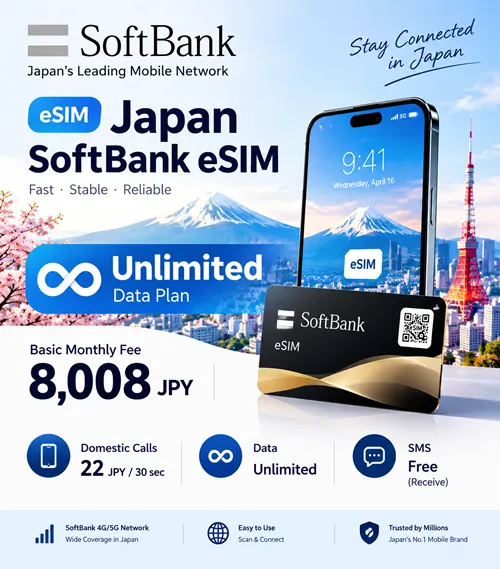
SoftBank Corp. is one of Japan's major mobile carriers, providing mobile data, voice calls, SMS and related communication services. This product is a SoftBank eSIM delivered after third-party signed registration - the card is already activated and delivered after real-person sign-up, and you can scan the QR code from your email to use it immediately. The unlimited plan is enabled by default, supporting domestic calls, SMS and unlimited data in Japan. Transactions on 321Acc (321acc.com) are protected - auto delivery to your email within minutes, USDT crypto payment supported, full privacy protection, and 24/7 after-sales support.
Product Details
SoftBank Corp. is one of Japan's major mobile carriers, providing mobile data, voice calls, SMS and related communication services.
This product is an eSIM delivered after third-party signed registration. Actual features depend on the real number, plan and contract status. Before ordering, please confirm whether the product includes a Japanese phone number, domestic calls, SMS, mobile data, international roaming and renewal services.
Please note: A third-party delivered eSIM does not mean the carrier contract has been transferred to you. Number registration details, management rights and continued use conditions are subject to the actual contract and carrier rules.
About the Carrier
SoftBank Corp. is one of Japan's telecom carriers, offering 4G/5G mobile communication, voice, SMS and international roaming services. Network coverage, plan benefits and billing rules are subject to the official information published by SoftBank.
Highlights
- Japan SoftBank network service - actual network and features depend on the plan;
- Digital eSIM delivery - no physical SIM card needed;
- Works with eSIM-compatible devices;
- Calls, SMS and mobile data available depending on the plan;
- Contact support before purchase to confirm number type, plan features and service period.
- Français
- Deutsch
This product description is for reference before purchase. Actual communication features, rates, roaming capability, number validity and continued use conditions are subject to the original contract, delivery information and official SoftBank rules. The carrier may manage numbers per the contract and relevant rules; we cannot guarantee the number will remain valid forever, nor that all third-party platforms will accept it.
How This Japan SoftBank Unlimited eSIM Plan Works
Japan SoftBank Unlimited eSIM is a data subscription rather than a physical SIM. You receive an activation profile by email, install it from the device settings, and the line comes up without a carrier visit or a store queue.
Coverage is tied to Japan networks, which means a local IP rather than a roaming one. That is the reason it is usually bought: services that block foreign addresses behave normally on a local connection.
Install before you travel, not after. The QR code needs a working data connection to download the profile, and airport wifi is the least reliable place to do it.
Keep the activation email. If the profile is deleted from the device, reinstalling needs the original activation details, and they cannot be regenerated later.
Use Cases
- Domestic calls, SMS and mobile data in Japan
- Unlimited data usage
- Registering and verifying with a Japanese phone number
- Contact online support before purchase to confirm number type and plan details
- Français
- Deutsch
How Is This Different From Other Products?
All SIM Card products in this series: the DuckChat HK SIM focuses on 30GB monthly data with a Hong Kong IP; the Korea KT eSIM focuses on Korean KT eSIM; the Japan SoftBank Unlimited eSIM focuses on SoftBank unlimited data eSIM in Japan. Choose the one that matches your needs.
Ordering & Usage Notes
After receiving the SoftBank Unlimited eSIM activation QR code, follow the "User Guide" section on this page to activate. Contact the 24/7 online support if you run into any issue.
User Guide Order Lookup
🌐 Official Entry & Usage Channels
• Official website: www.softbank.jp (SoftBank Corp. official)
• Official rates: SoftBank mobile plans
• eSIM guide: SoftBank eSIM activation guide
• Activation: the card is already activated and delivered after real-person signed registration. Once you receive the QR code in your email, scan it promptly to download the eSIM to your phone and start using it.
💳 Rate Reference
The unlimited plan is enabled by default. Base monthly fee: 8,008 JPY. Domestic calls: 22 JPY / 30 sec. Data: unlimited. SMS: receiving is free; sending costs ¥3.3–¥33 per message depending on the character count.
📋 Shopping Notes
• Order lookup: after payment, check the order status and delivery info on the order completion page or in the "Order Center". Actual delivery time follows the product page;
• Delivery: this product is a SoftBank eSIM delivered after third-party signed registration;
• Registration: the original carrier contract is registered under the third-party signer; buyers cannot change the real-name information;
• After-sales: the scope of product delivery, activation assistance and troubleshooting follows the store's published after-sales rules. Carrier suspension, contract changes, number recycling and failed identity verification are handled per the actual contract and carrier rules;
• Security: do not share your eSIM QR code, activation code, SMS verification codes or account information. The QR code may only be usable once - do not scan it repeatedly on unverified devices;
• Wholesale: contact support before bulk purchase to confirm available quantity, number type, contract status, delivery method and after-sales arrangement.
🔐 How to Activate
1. Make sure your phone supports eSIM;
2. Connect your phone to a stable Wi-Fi network;
3. Scan the QR code and add the eSIM following the prompts;
4. After activation, check signal, mobile data, calls and SMS;
5. If you cannot connect, move to an area with stronger signal and try again;
6. Contact support immediately if you meet any problem during activation - do not test repeatedly on your own.
💡 Important: whether the eSIM activates, can be transferred to another phone, and remains usable afterwards depends on the specific contract and carrier settings. Do not delete an installed eSIM, and do not treat it as an ordinary QR code that can be reinstalled unlimited times.
📶 International Roaming
By default, international roaming is not enabled - the card can only be used within Japan. If you need to use it outside Japan (e.g. enable roaming), please tell support when you order.
Official entry: SoftBank usage abroad guide
🛡️ Number Status & Continued Use
• This product is an eSIM delivered after third-party signed registration. Continued availability of the number is affected by the original contract, bill payment and carrier management rules;
• The original signer may still hold contract management rights, so buyers cannot assume independent renewal, card replacement, device change, number transfer or re-activation rights;
• Confirm the service period, renewal method, suspension handling and after-sales responsibility after the number expires before purchase;
• This product is not guaranteed to be valid forever; do not apply the retention cycle of other carriers' prepaid cards to a SoftBank monthly number.
🌱 Safe Usage Tips
• Use the communication service in compliance with Japanese laws and SoftBank terms of service;
• Do not use the number for fraud, harassment, spam SMS or other illegal purposes;
• Do not use the eSIM for unauthorized account registration, identity impersonation or bypassing platform security verification;
• If the number is suddenly suspended, cannot receive SMS or use data, contact us first to check the product status. Contract issues with the carrier may require the original signer to contact SoftBank.
Frequently Asked Questions
Do I need to remove my physical SIM?
Scan the QR code in the email from the device settings, name the profile, and let it install. Your normal SIM stays in place and keeps working.
When does the plan start counting?
Install it before departure but only switch the line on when you land, so the plan is not consumed while you are still abroad.
Is a VPN still necessary?
Not normally. The connection is local, so services that check for a regional address see one.
What if I switch phones?
Keep the activation email. Reinstalling needs those original details and they are not regenerated automatically.
What payment methods are supported?
USDT (TRC-20 network) payment via your crypto wallet - fully anonymous and secure. The system delivers automatically once payment is confirmed.
How long does delivery take? How do I receive it?
Delivery is fully automatic - the eSIM activation QR code is sent to your email within minutes of payment. Please check your inbox (including the spam folder).
Is there after-sales support? What if I have issues?
The scope of product delivery, activation assistance and troubleshooting follows the store's published after-sales rules. Carrier suspension, contract changes, number recycling and failed identity verification are handled per the actual contract and carrier rules. Contact the Telegram live support (24/7) on the right side of the page any time.
Japan SoftBank Unlimited eSIM - digital eSIM card (no physical delivery), delivered after real-person signed registration. After payment, the activation QR code is automatically sent to your email - scan it on an eSIM-compatible phone to activate and use. USDT (TRC-20) payment supported, full privacy protection, 24/7 live support.
After-Sales Support · 15-day Usage Guarantee
321Acc provides a 15-day after-sales guarantee for purchased accounts. Under normal usage, if you encounter:
Login Security Verification
Assistance with account login verification issues
Phone Verification
Assistance with bound phone verification
Face Verification
Assistance with face verification during use
Account Anomalies
Assistance with abnormal account situations
Usage Guidelines & Agreement
To ensure stable account operation and extend account lifespan, please follow these usage recommendations:
Initial Usage of New Accounts
- Avoid frequent password changes
- Avoid mass profile edits in a short period
- Avoid frequent avatar / nickname / bio changes
- Maintain normal and natural usage behavior
- Français
- Deutsch
The first 7 days after delivery form a settling-in period; it is recommended to use the account gradually.
Network Environment
- Keep a stable network environment long-term
- Prefer fixed IP or a stable VPN environment
- Avoid frequently switching networks across regions
- Avoid multi-user / multi-device simultaneous logins
- Français
- Deutsch
A stable network significantly reduces abnormal login risks.
Social Behavior
- Avoid mass friending within a short period
- Avoid sending duplicate content in bulk
- Avoid abnormally high-frequency interactions
- Follow each platform's community rules
- Français
- Deutsch
Especially on X, Facebook, Telegram and similar platforms, stable and natural habits help long-term account health.